
Text-to-Image with Hugging Face
Leverage state-of-the-art AI models to generate stunning images from textual descriptions.
Introduction
This project uses Hugging Face's Stable Diffusion Pipeline to generate high-quality images based on user-provided text prompts. It showcases the seamless integration of AI tools for creative and functional purposes.
- Framework: Streamlit for interactive UI
- Model: Stable Diffusion (runwayml/stable-diffusion-v1-5)
- Device Support: CPU and MPS (Apple Silicon)
Technical Implementation
1. Model Architecture
The project utilizes the StableDiffusionPipeline from Hugging Face's diffusers
library. This pre-trained model is fine-tuned for generating detailed and realistic images from textual
descriptions.
- Text Encoder: Encodes the user-provided prompt using a transformer-based model.
- Image Decoder: Uses a denoising diffusion probabilistic model (DDPM) to create high-quality images.
- Device Optimization: The model supports both
float32(CPU) andfloat16(MPS) precision for faster computation.
2. User Input and Prompt Handling
Users input prompts directly into the Streamlit app. The prompt is validated and passed to the Stable
Diffusion
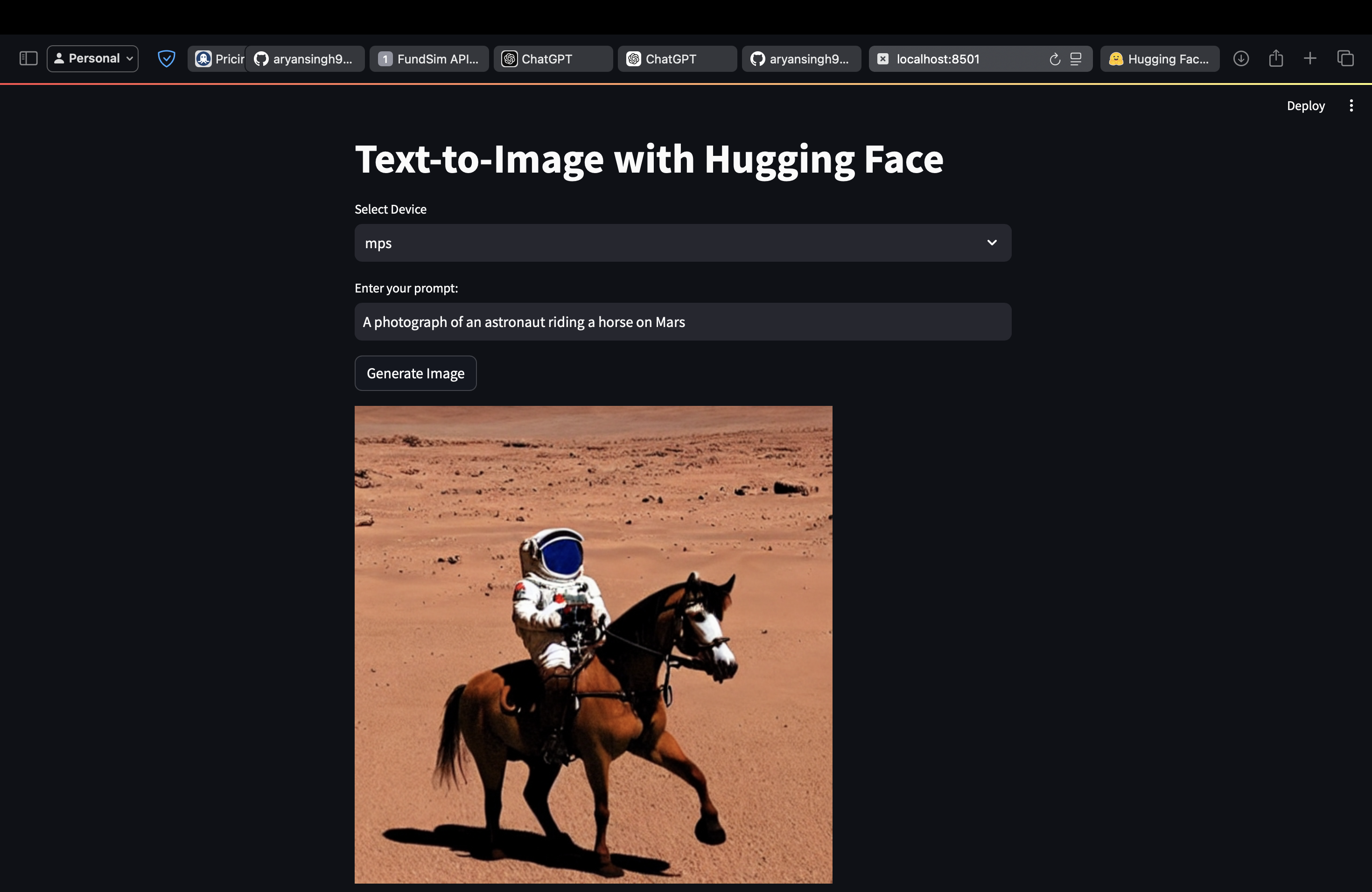
model. For demonstration purposes, a default prompt is provided:
"A photograph of an astronaut riding a horse on Mars."
3. Model Deployment
The application is built using Streamlit, which provides a responsive web interface. Key
technical
details:
- Device Selection: Users can select between
CPUandMPSfor model inference. - Caching:
@st.cache_resourceensures that the pipeline is loaded only once per session, significantly reducing runtime overhead. - Processing: The pipeline processes the input prompt to generate an image using the selected computation device.
4. Image Generation Pipeline
The image generation process follows these steps:
- Text-to-Embedding: The prompt is encoded into text embeddings using a language model.
- Diffusion Process: A noise-injection and denoising algorithm progressively refines an image representation.
- Output: A high-resolution image is produced and displayed directly within the Streamlit app.
5. Performance Optimization
To ensure smooth and efficient image generation:
- Precision Tuning: The model uses
float16on MPS devices to optimize memory usage and reduce inference time. - Parallel Processing: Streamlit leverages asynchronous tasks for responsive UI during image generation.
- Hardware Flexibility: The application adapts to both Apple Silicon devices (via MPS) and standard CPUs.
Project Demonstration
Below is an example of a generated image based on the prompt: "A photograph of an astronaut riding a horse on Mars."
Key Highlights
- Interactive Streamlit app for real-time user input.
- Efficient loading of AI models using Hugging Face's `diffusers` library.
- Support for multiple devices (CPU and MPS) for enhanced flexibility.
- High-quality image generation tailored to user prompts.
GitHub Repository
Access the complete code, app, and documentation here: GitHub Repository
Developed by Aryan Singh. Explore the full implementation on GitHub.